
The Tapatahi app
The whole team. One app.
Stats that actually mean something, a Locker Room that feels like your feed, DMs with a parent safety net, an AI coach called DOC, Apple Health readiness, a live team map, and a coach desk on the web. Built in Aotearoa for youth basketball.
iPhone and iPad, iOS 15.1 or later. Players and parents join free with a team code.


The Tapatahi team, live
Same squad. Every screen.
Real screens from the Tapatahi team. Swipe through, then scroll down for how each bit actually works.



For players
Your season. Your numbers.
Every point, assist and board you put up lands in the app and turns into something worth looking at. Here’s what’s on your phone.
Home
The next game, the next training, your RSVP, readiness and the latest team photos, all on one screen.
Auto MVP. Whoever leads the squad in season points gets the MVP spot on Home, with an animated border. Nobody picks it. You earn it.
Squad & player cards
Every player gets a profile: photo, position on the court, PTS / AST / REB, trends over the season and DOC insights.
Tap a player to open their card. Their season line is theirs alone, not a team average. Games played goes up once per game, however many times a stat line is logged for it.
Season Hub
Record, streaks, charts, award cards, a highlight reel and an automatic weekly summary.
The ECG. Each game is one beat on the trace. A win spikes up, a loss spikes down, so you can read the whole season at a glance.
Trophy Room
Season MVP, the Player of the Day shelf, honour cards and weekly awards, kept with the team that earned them.
MVP and Defensive award snapshots are saved to the shelf.
Games & training
Fixtures with the venue map, time and result. Training has the schedule, RSVP, and attendance and consistency charts.
Hit RSVP and the coach sees who’s coming before anyone gets to the gym. Forget to answer and Tapatahi reminds you (more below).
Game-day pushes
At 8am on game day: “Game day. You’ve been putting in the work. Trust it. Go get it today.” On Sunday, DOC sends a weekly round-up.
The Sunday round-up covers your points, assists and rebounds for the week. Live and huddle starts get a push too. The game-day push comes from Tapatahi itself now, so it lands even if no coach opens the app.
RSVP reminders New
No answer for training yet? You get “Are you coming?” the day before and again about 2 to 3 hours out. Tap it to answer. If a player still hasn’t replied, their linked parents get a “No reply yet” nudge too.
Two nudges at most per session, and nothing between 9pm and 7am. They’re on for every team. You can turn them off for yourself in Preferences → RSVP Reminders.
Album
Team photos and video from the season, in one shared album for the squad.
Avatar builder
Build your own avatar and wear it across the app.
Weather
The forecast in the app, plus a weather badge on every game and training.
Locker Room
Built like your feed. Only your team’s in it.
The Locker Room works like Facebook: posts, photos, likes and comment threads. The difference is it’s locked to the squad. No public feed, no randoms, nothing for a stranger to scroll.
- One + for everything NewThe + at the top of the Locker Room opens Upload photo, Carpool post, Poll and Jobs. Coaches get Practice plans in there too. Photos come from your library or straight from the camera.
- Like and commentEvery post has a like count and its own comment thread.
- Push-to-talk voiceHold to record a voice note into the Locker Room, for when typing won’t cut it.
- Block and reportAnything off can be reported or blocked straight from the post.
Team tools New
Polls, jobs and carpools. Sorted in the team.
The group-chat admin, without the group chat. Tap + in the Locker Room and pick Poll, Jobs or Carpool post. Everything sits on one Team tools screen with three tabs.
Polls
The coach asks a question with 2 to 6 options. Everyone on the team votes, and the results show counts and percentages as they come in.
The coach closes the poll when it’s decided.
Jobs
Scorebench, oranges, shot clock. The coach adds a job to a game or training and anyone can tap I’ll do it. Each job shows who’s taken it or that it’s still needed.
Can’t make it after all? Tap Give it back and it’s open again.
Carpools
Coaches and parents offer seats for a game or training (1 to 7 seats, with a short note). Others tap Take a seat and the seats left count down.
Players can see the offers but only coaches and parents can offer or take seats.
Carpools, kept safe
No home addresses. Tapatahi blocks a note that looks like an address, so pick-up spots get agreed by DM or in person.
The driver can take an offer down, and coaches can remove any offer.
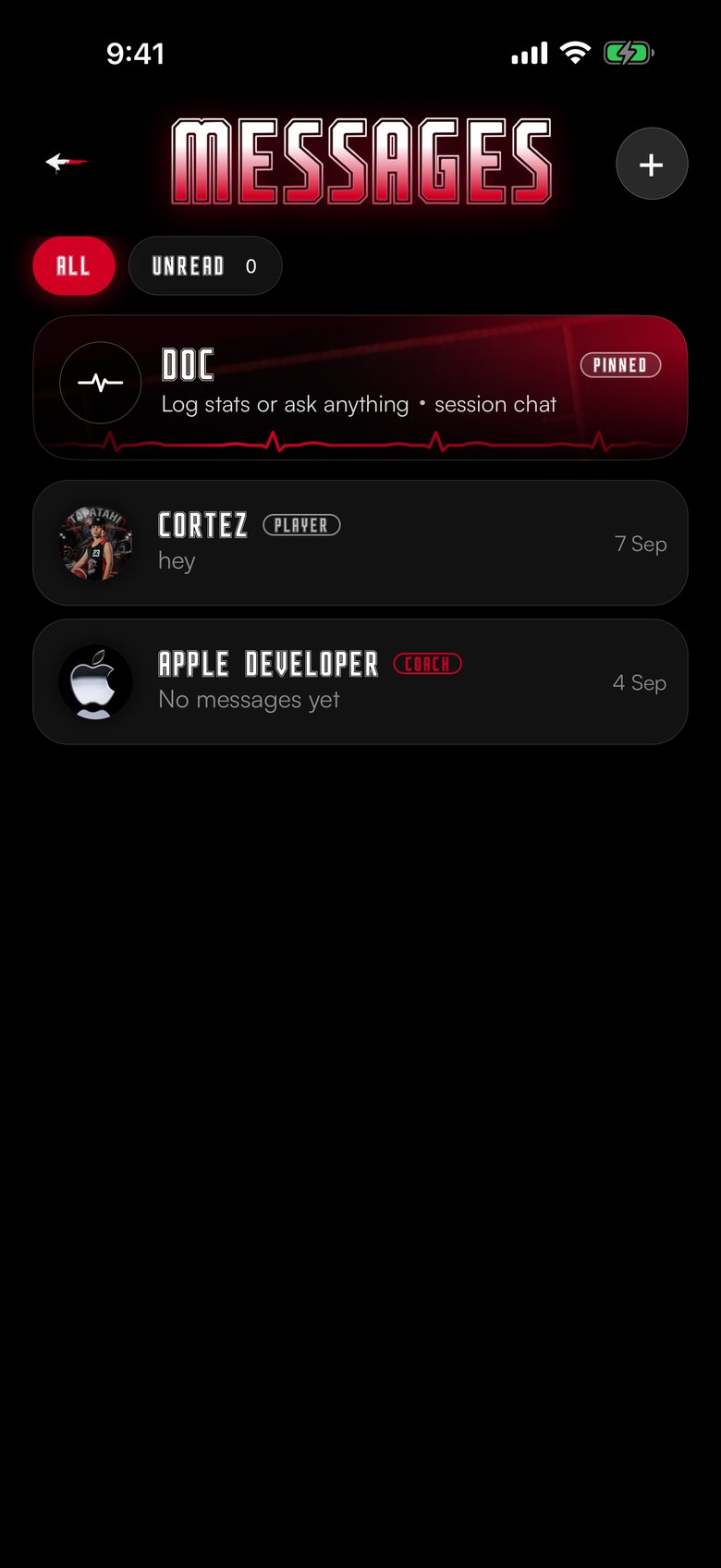
Messages
Text it. Say it. Send a clip.
Direct messages between teammates, coaches and parents. The Locker Room is for the team; Messages is the 1:1 stuff.
- 1:1 DMsPrivate threads with anyone on your team.
- Voice messagesHold to talk. You get a quick confirm before it sends, so nothing goes out by accident.
- Video messages that expireSend a short video. It cleans itself up after 7 days.
- DOC has a thread tooDOC sits in your messages like a teammate. Coaches can text a stat line, like STAT UPDATE Cortez PTS 5, and the squad updates.
- Guardian copy for under-16sWhen a linked player is under 16, their DMs are copied to their parent. More on that below.
For parents
Linked in. Not left out.
Parents join free. Link to your kid and you get their schedule, their season, and a copy of the private messages if they’re under 16. Offer carpool seats and grab team jobs from the same app.
Join the team
Sign up as a parent with the team code. It’s free.
Pick your kid
Choose your child from the team roster and send a link request. Not ready? Tap “link later”.
Coach confirms
The coach checks it’s really you and confirms the link. No coach OK, no link.
You’re linked
Guardian copy, live location with your player, under-16 approval for team location sharing and “No reply yet” RSVP nudges all run off this link.
Guardian copy
The message the player gets, the parent sees.
Link a parent to a player. If that player is under 16, a direct message sent to them is copied into the parent’s chat with the sender, labelled as a guardian copy, and the parent gets a push. Team chat stays with the team. This is the private thread.
Copies go out only when a parent is linked and the player’s age on the squad list is under 16. The copy is the message text, kept short, marked so it cannot be mistaken for a new chat.
For coaches
Run the team from your phone. Or your laptop.
Roster, roles, stats, injuries, game night and sign-ups. Everything a coach does at the gym, and the paperwork after.
Coach desk online
Your team on a big screen: Overview, Games & stats, Analysis, DOC, Sign-ups and VIP. Same login as the app.
Stats come from the app, so the desk and every phone show the same numbers. Send a team push from the desk too.
tapatahi.co.nz/coach Open the coach desk VIPOnline team sign-ups
Share your own sign-up link and players sign up to your team on the web. Every sign-up lands in one table on the desk.
New When they open the app with the same verified email, the team code is already filled in. They tap JOIN TEAM, you still approve, and the position and goals from the form carry over.
tapatahi.co.nz/register?team=CODE See the sign-up pagePractice plans New
Build a session from the drill library: add drills, set the minutes for each (up to 20 drills, 1 to 60 minutes each), name it and save it. Or tap Start a 60-minute plan for a ready-made warm-up, two focus blocks, team play and cool-down.
Saved plans show to the whole team, so everyone knows what’s on before training. Open it from + in the Locker Room.
Drill library New
25 basketball drills built in, filtered by focus: warm-up, ball handling, shooting, passing, defence, rebounding, conditioning, team play and cool-down.
Each drill shows the minutes, ages and gear, and opens up to the steps and a coaching point.
Roles that make sense
Coach, assistant coach, player and parent. Assistant coaches need the head coach’s approval, and head coach can be handed over.
Players and parents join with your team code.
Squad analytics
Squad card analytics and trends for every player, plus DOC’s read on where the team is at.
Injury log
Log the body part, how bad it is, and notes. The player’s card shows an “out injured” badge so everyone knows.
Game Day Hub
Go live with a team livestream, or start a group video call when the gym is the point.
Team switcher
Coach more than one team? Switch between them in a tap. VIP covers every team you coach.
Coach DOC in plain English
Tell DOC the score, the stat line or the next training and she does the admin.
More in the DOC section below.
How coach DOC worksThe VIP page
Everything on the desk, VIP and how to get it, on one page.
See what VIP gives youYour team gets its own sign-up page.
Most sports apps give you an app. VIP gives your team a website too.
- Share your link
- They sign up on the web
- It lands on your desk
- They join in the app
One account, app and web
The login you make in the Tapatahi app is the one the website uses. Coaches sign in to the coach desk with their app email and password, and the desk and the app show the same teams and numbers. The team sign-up page doesn't make a second account: sign in to the app (or create your login there) with the same email, verify it, and your team code is filled in.
DOC · AI coach
Big sister energy. Knows your stats.
DOC is the AI coach in the app, with a warm Kiwi voice. She’s in chat, has her own DM thread, sits as the orb on Home, and you can just talk to her.
- Talk, don’t typePush-to-talk voice in, spoken replies back.
- Remembers youDOC keeps memories and follows up later: “how did that free-throw work go?”
- Drills with videoAsk what to work on and get drill picks with YouTube videos, plus your readiness card and the readiness race.
- Knows your cultureDOC uses your team creed and code of conduct when she talks to your squad.
- Coach commandsCoaches can say it in plain English: log or clear stats, create a game, enter a result, set a training, post an announcement, draft a session plan, get a team analysis, update a bio, recommend drills, pick Player of the Day, or check the weather.
DOC is part of VIP, and is tuned for basketball right now.

Apple Health · Watch
Know if you’re ready before tip-off.
Tapatahi reads Apple Health and turns it into one readiness score. Wear an Apple Watch and it just works. No extra watch app needed.
- Readiness scoreBuilt from your sleep, active energy and steps.
- Syncs itselfPulls from Apple Health when you open the app. Not on Health? Enter it yourself.
- You choose who sees itSharing with coaches is opt-in. Until you turn it on, only you can see your numbers.
- The readiness raceWhen a linked parent or coach and a player both share, they go head to head on readiness.
Team map
Who’s here, who’s close.
Live location for your linked family, an arrival alert for the team, and tournament mode for the big days. It’s strict about under-16s.
Set it once New
Pick your location setting in Preferences: Always on, Auto or Always off. The map follows it, with no switch of its own to forget about.
Auto is the default. Always off means nobody sees you and no arrival alerts.
Linked family only New
Live location is for a player and their linked parents (up to two). On Always on, they see each other whenever Tapatahi is open. Outside a tournament, nobody else sees you, coaches included.
Close the app and your pin drops off within minutes.
“Kai’s here”
From an hour before a training or game, arrive within 150m of the venue and the team gets one push that you’ve made it. Once per person, per event, and no location is shared with it.
Players and coaches send arrival alerts. Parents arriving don’t.
Tournament location New
Big day out? The coach switches tournament location on for 8 hours and the team gets a push. Each person chooses whether to share. Say yes and the whole team can see you on the map.
It updates in the background about every 5 minutes to save battery, and stops itself when the 8 hours are up. The coach can switch it off early.
Under-16 rules
An under-16’s arrival alerts and tournament location only reach the team once a linked parent approves. Until then, arrival pings go only to coach-confirmed parents.
No linked parent? Under-16s are asked to get a parent to link to them first.
Get there
Directions and the driving route, a leave-by reminder, follow-me and destination search.
Nothing hangs around
Locations expire. Always-on pins drop off soon after you close the app, and tournament pins end with the 8 hours.
Safety & privacy
Built for kids. Built for the parents of kids.
Youth sport means young players. The safety stuff isn’t a settings page you have to find. It’s built into how the app works.
Guardian copy
DMs to a linked player under 16 are copied to their parent, labelled, with a push.
See how it worksDOC safety checks
DOC runs age-tiered safety checks on what’s said to her. Three or more flags in 24 hours and the coach and parent get a heads-up.
Report and block, everywhere
In DMs, the Locker Room, the album and calls.
App lock
Lock Tapatahi with Face ID or a passcode if you want to.
Team-only by design
Your data stays with your team. No public feed. Your email is kept in a private record only you can read.
13+ accounts
Accounts are for 13 and over. Younger players use a parent’s login.
Read the privacy policy FreeDelete it any time
Delete your account in the app, or on the web.
Delete accountVIP
Make it look like your team.
VIP lets a coach set the team’s primary and secondary colours, and the whole app follows. Buttons, glows, cards, the lot. Tapatahi keeps text readable whatever you pick. Add a home background and your team creed and code of conduct, and DOC will use them.
- First coach team Free
- 30-day VIP trial on your first team, no card
- VIP yearly NZ$59.99/yr
One subscription unlocks VIP on every team that coach owns. Players and parents are always free. Price shown in-app and may vary by region.
HOME
Game day Saturday
RSVPTap a colour. That’s the colour changer.
Free for everyone
Players, parents, and a coach’s first team.
- Messaging
- Roster & squad
- Games
- Training
- Locker Room
- Player of the Day
- Season Hub
- RSVP reminders
- Polls, jobs & carpools
- Practice plans & drills
VIP unlocks
For the whole team, on every team you coach.
- DOC
- Readiness & Health
- Weather
- Team map & tournament location
- Team switcher
- Team colours
- Backgrounds
- Team creed
- Avatar editing
- Album
- Trophy Room
- Live
- Group call
- Coach desk & sign-ups
Basketball is live now. More sports coming (rugby, netball).

Put the season in their pocket.
Download on the App StoreiPhone and iPad. Android is on the way. Accounts are for 13 and over — younger players use a parent’s login.